

In this video, we continue with the TDS Navisworks MCP Bridge. In the first video, Claude could read a live Navisworks model and act on it. This time we go the other way — taking information out of drawings/documents and putting it onto the model.
On a real project, the information about your equipment sits in documents: datasheets, drawings, registers. The model mostly just carries the geometry. Getting that information onto the model normally means typing it in by hand, property by property, item by item. Here we use the original drawing for that model instead.
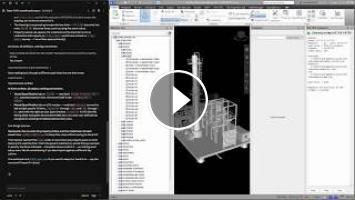
We give Claude a scanned equipment drawing — a cracking tower, C1101 — and ask it to put the vessel specification and the nozzle specification onto the right items in the open Navisworks model.
• Reads the drawing set and finds the C1101 sheet
• Reads the two specification tables off a scanned page
• Queries the live Navisworks model through the Bridge to see what is actually there
• Matches every row in the drawing to a real item — the tower, twelve nozzles and three manholes
• Stages everything into an Excel workbook, and checks it against the model row by row
• Stops and asks four questions before importing
• Imports the values, then reads them back through a different route to verify
• Selects and zooms to the tower so the new properties can be checked against the drawing
The part I find most useful is the checkpoint.
Claude does not import and then report. It stops before writing and asks. In this case it flagged that the drawing prints "PS1" where it clearly means PSI, how the shell and heads columns should be handled, one manhole row that actually covers three separate items, and whether the drawing number from the title block should travel onto the vessel as well. We answered in one line, and only then did anything reach the model.
The demonstration runs in real time. The pauses you see are Claude actually working — reading the pages, querying the model and matching the rows.
ABOUT TDS ENGR SOLUTIONS
TDS Engr Solutions Pte Ltd is based in Singapore and provides engineering software solutions, training, consultancy and custom development.
Our work includes:
• AVEVA E3D / Unified Engineering training and consultancy
• Autodesk Navisworks and Plant 3D training
• Custom plugin and engineering application development
• Engineering IT consultancy
• Workflow optimisation and automation
• AI-assisted engineering workflow development
We focus on practical solutions that help engineering teams make better use of their existing software, project data and engineering workflows.
Website: https://www.tdsengrsolutions.com
Email: sales@tdsengrsolutions.com
If you found this useful, please like and subscribe.
We will be sharing more practical examples of using AI, MCP and engineering software in upcoming technical presentations.
#Navisworks #MCP #ClaudeAI #AI #AutodeskNavisworks #EngineeringAI #DigitalEngineering #BIM #EngineeringSoftware #TDS
On a real project, the information about your equipment sits in documents: datasheets, drawings, registers. The model mostly just carries the geometry. Getting that information onto the model normally means typing it in by hand, property by property, item by item. Here we use the original drawing for that model instead.
We give Claude a scanned equipment drawing — a cracking tower, C1101 — and ask it to put the vessel specification and the nozzle specification onto the right items in the open Navisworks model.
• Reads the drawing set and finds the C1101 sheet
• Reads the two specification tables off a scanned page
• Queries the live Navisworks model through the Bridge to see what is actually there
• Matches every row in the drawing to a real item — the tower, twelve nozzles and three manholes
• Stages everything into an Excel workbook, and checks it against the model row by row
• Stops and asks four questions before importing
• Imports the values, then reads them back through a different route to verify
• Selects and zooms to the tower so the new properties can be checked against the drawing
The part I find most useful is the checkpoint.
Claude does not import and then report. It stops before writing and asks. In this case it flagged that the drawing prints "PS1" where it clearly means PSI, how the shell and heads columns should be handled, one manhole row that actually covers three separate items, and whether the drawing number from the title block should travel onto the vessel as well. We answered in one line, and only then did anything reach the model.
The demonstration runs in real time. The pauses you see are Claude actually working — reading the pages, querying the model and matching the rows.
ABOUT TDS ENGR SOLUTIONS
TDS Engr Solutions Pte Ltd is based in Singapore and provides engineering software solutions, training, consultancy and custom development.
Our work includes:
• AVEVA E3D / Unified Engineering training and consultancy
• Autodesk Navisworks and Plant 3D training
• Custom plugin and engineering application development
• Engineering IT consultancy
• Workflow optimisation and automation
• AI-assisted engineering workflow development
We focus on practical solutions that help engineering teams make better use of their existing software, project data and engineering workflows.
Website: https://www.tdsengrsolutions.com
Email: sales@tdsengrsolutions.com
If you found this useful, please like and subscribe.
We will be sharing more practical examples of using AI, MCP and engineering software in upcoming technical presentations.
#Navisworks #MCP #ClaudeAI #AI #AutodeskNavisworks #EngineeringAI #DigitalEngineering #BIM #EngineeringSoftware #TDS
- Категория
- Заработок на AI
Выполните вход или зарегистрируйтесь для отправки комментария.
Комментариев нет.
Следующее
Auto
-
05:22

Stable Diffusion Hoạt Động Thế Nào? Bí Mật Nằm Ở Đây!
-
51:08
NGƯỜI VIỆT GÓP SỨC XÂY DỰNG GROK-3: Hành Trình Từ Huy Chương IMO Đến ĐỈNH CAO AI Thế Giới
-
2 Robot Có Thể Thay Thế Toàn Bộ Nhân Viên Giữ Xe?
-
02:27
AI Search is changing how people discover information — including doctors and healthcare services.
-
03:06
Stable Diffusion Tạo Ảnh Như Thế Nào? Giải Mã 50 Bước Từ Một Seed!
-
00:33
Claude Can Now Edit Full Videos Using DaVinci Resolve's Official MCP
-
31:50
Claude Code от А до Я: агенты, MCP, Skills, CLAUDE.md и GitHub
-
01:27
Make information visual with ChatGPT
-
00:19
MÌNH THAY THẾ ĐỐNG DÂY DUPONT BẰNG BREADBOARD #huyaiautomation
-
00:35
How ChatGPT Reads Huge Documents So Fast
-
13:39

Best AI Tools For Research in 2026 (Beats ChatGPT & 0% Detection)
-
00:37

3 AI tools for programmers
-
00:55

The Best AI Tools For Content Creators
-
00:58

7 AI tools you NEED to try!
-
00:12

Best AI Tools For Hacker
-
11:15

10 Best AI Tools You MUST Try in 2025
-
00:28

The most popular AI tools right now... which one is best?
-
00:36

Best Free AI Tools for Research Papers & Essays | Write Smarter!
-
14:34

Google's NEW AI Tools Will BLOW YOUR MIND | Google I/O 2026
-
00:18

Best FREE AI Tools for Designers | Boost Your Creativity #ai #aitools #graphicdesign #designer
 Загрузка...